
Everything G.A.I.N does, in one place.
Discover Shadow AI, detect sensitive data on the device, apply policy actions, and turn the evidence into client-ready Trust Reports. Start with a free 7-day Exposure Snapshot, then switch on the controls your team needs.
Works with ChatGPT, Claude, Gemini, Microsoft Copilot, Perplexity, and more.
See what your team shares with AI. 7 days, no card.
Explore the live demo
Read-only demo with sample data. No signup.
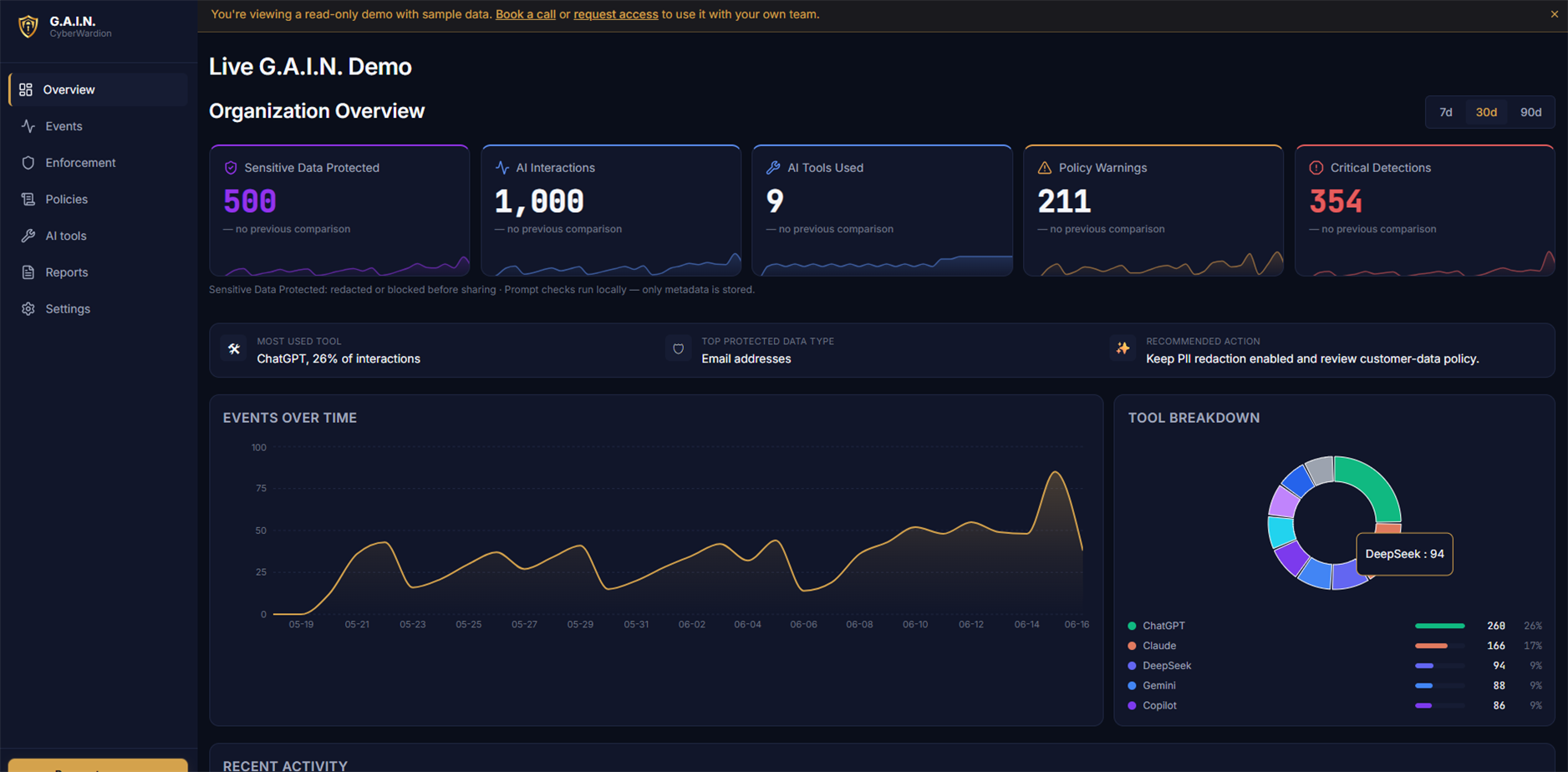
See which AI tools your team actually uses.
Most companies underestimate AI usage by 5 to 10x. G.A.I.N. surfaces real usage across ChatGPT, Claude, Gemini, Microsoft Copilot, Perplexity, and other web AI tools, by department, by tool, and by week. No more guessing what your team is actually doing. Anonymous by default. No employee names in the dashboard.
- Live inventory of AI tools in use
- Usage by department, role, and risk
- Trends across weeks and months
- Zero disruption to employees
- Context-scored API keys, tokens, and credentials
- Validated cards, IBANs, IDs, and PII
- Browser prompts and developer tool requests
- Metadata-only events with no prompt storage
Catch real secrets before they leave the device.
G.A.I.N. validates what it finds, including card checksums, IBAN checks, national ID guards, secret validators, and surrounding-text confidence scoring. Real risks are redacted, warned, blocked, or logged on-device. Obvious examples, masked values, password-reset questions, and year-like numbers are suppressed. The same on-device scan covers typed and pasted text plus text files attached to supported AI tools. We never see your prompts or files.
Redact
secrets and PII masked locally
Block
passwords and private keys stopped, not sent
Warn / Log
lower-risk activity recorded
Prompt content never leaves the browser.
G.A.I.N. is built privacy-first. Detection runs locally on the device. In hosted mode, only anonymized event metadata is sent to our backend: the tool used, risk category, timestamp, and action taken. In self-hosted deployments, that metadata stays inside your own environment. Prompt content, keystrokes, clipboard, and screenshots are never collected, transmitted, or stored.
Two ways to run it. You choose.
Hosted (default): only anonymized event metadata reaches our servers. Your prompt content never does. Self-hosting is available for regulated and enterprise customers on request, where nothing reaches us at all, not even metadata. You own everything.
Built for European data rules.
Designed for GDPR and the EU AI Act. Self-host to keep all data inside your own organisation. Your prompt content never leaves the device in either mode.
Turn AI activity into client and auditor trust.
Every month, G.A.I.N. generates a Trust Report that summarizes AI tool usage, detected risks, policy controls, and remediation activity. Share it with clients, auditors, prospects, and regulators to prove responsible AI use, without exposing a single line of prompt content.
- Monthly client- and auditor-ready PDF
- Tool inventory and usage trends
- Risk events and remediation actions
- Policy controls in effect
For the people accountable for AI risk.
G.A.I.N. is built for founders, CISOs, MSPs, and compliance teams who need to prove responsible AI use to clients, boards, regulators, and themselves.
Founders & CEOs
Show prospects and investors that AI is governed, not chaotic.
CISOs & Security
Bring Shadow AI under the same visibility you already have for SaaS and endpoints.
MSPs & Compliance
Deliver AI governance as a service, with a defensible Trust Report per client.
How it works
Deploy
Push silently with managed browser policy, or install from the browser store for small teams and BYOD users.
Discover
See real Shadow AI usage across every supported AI tool, in minutes.
Govern
Warn employees before sensitive data is shared with an AI tool.
Report
Share a monthly Trust Report with clients, auditors, and leadership.
Frequently asked questions
What is Shadow AI?
Shadow AI is the unsanctioned use of generative AI tools, including ChatGPT, Claude, Gemini, Copilot, Perplexity, and others, by employees without IT or security visibility. It is the fastest-growing source of accidental data leakage, IP exposure, and compliance risk in modern companies.
Does G.A.I.N. block AI tools?
Yes, when a company chooses that policy. G.A.I.N. can block disallowed AI tools and hard-stop the highest-risk secrets, while the default workflow focuses on visibility, local redaction, warnings, and reporting so productive AI use can continue safely.
What does G.A.I.N. collect?
Only metadata: which AI tool was used, timestamp, risk category, severity, action taken, and content length (character count, never content). G.A.I.N. never collects prompt content, keystrokes, screenshots, clipboard, or browsing activity outside supported AI tools.
Does G.A.I.N. read employee prompts?
No. Detection runs on the device in the browser extension and local agent. Prompt content never leaves the device. Security and admin dashboards only ever see anonymized metadata. That is the privacy guarantee G.A.I.N. is built on.
Which AI tools does it detect?
Browser coverage includes ChatGPT, Claude, Gemini, Microsoft Copilot, and Perplexity. Developer workflow coverage includes Claude Code and Copilot CLI through the local agent. Cursor is documented as limited where it cannot reliably use a local gateway. G.A.I.N. activates only on supported AI tools and configured workflows.
How does the Trust Report help clients and auditors?
The monthly Trust Report shows which AI tools were used, what risks were detected, which policies were enforced, and what remediation occurred. It gives clients, auditors, and regulators a clear, evidence-backed view of responsible AI use without exposing any sensitive content.
How fast can a company deploy it?
Most managed teams are live the same day. IT can silently force-install G.A.I.N. with managed browser policy and push the Organization Key automatically. Smaller teams and BYOD users can install from the browser store and connect with the Organization Key. AI usage events appear in the dashboard within minutes of the first prompt.
Ready to see your AI exposure?
Book a 20-minute call with our CEO. We'll walk through visibility, risk controls, and the Trust Report tailored to your stack.